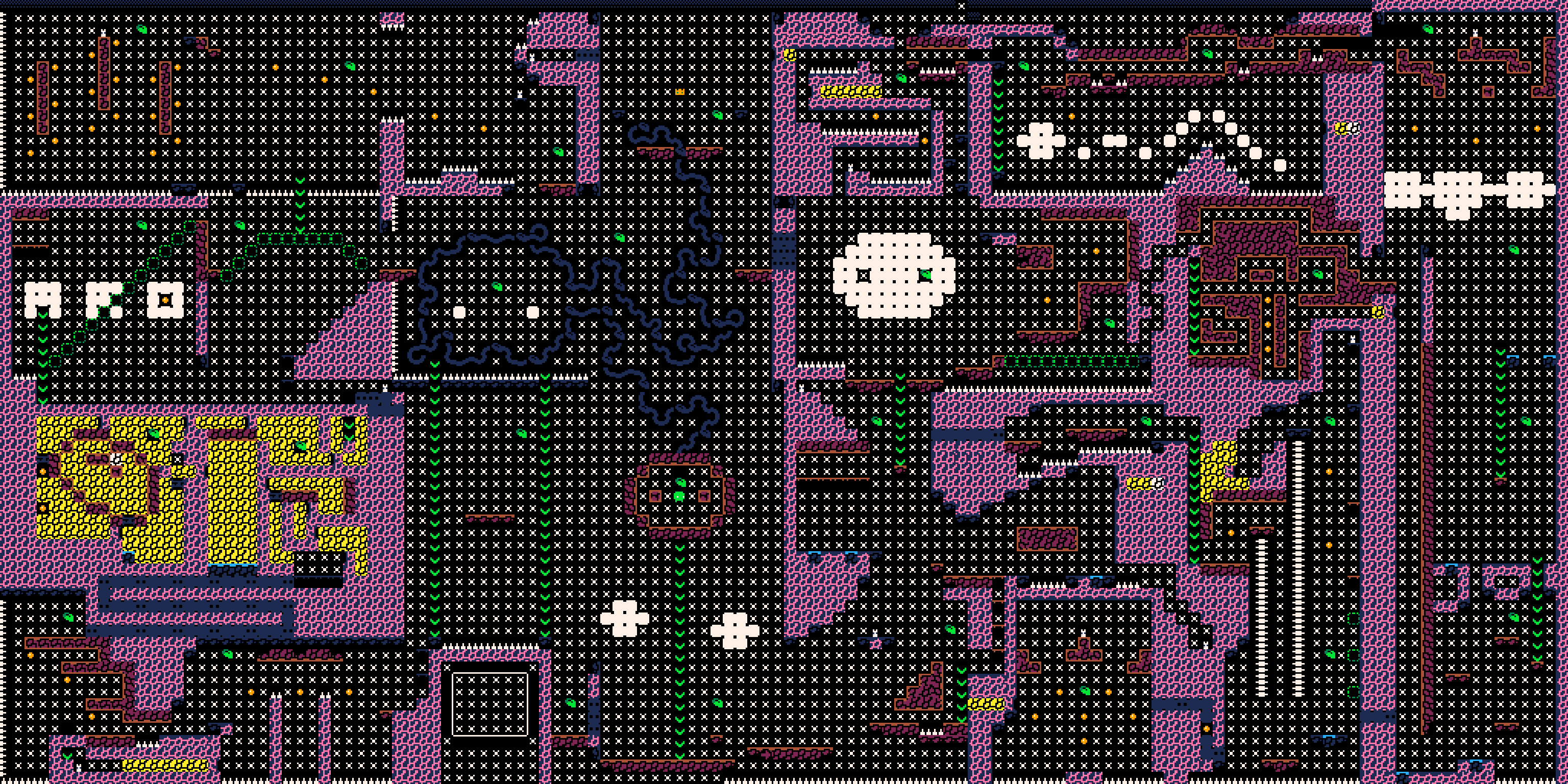
The complete Moss Moss map
This is the whole world, not a section of it: 128 by 64 tiles of level geometry, which is 8 screens across and 4 screens down. It was decoded from the cartridge data that the browser build of Moss Moss ships with, then rendered at 3× with the game's own tile graphics, so what you see is the level as the engine reads it rather than a redrawn approximation.
How the screen grid works
Every square in the map is one screen: 16 tiles by 16 tiles, which is 128 by 128 pixels, exactly the size of the PICO-8 display. The game is therefore a grid of 32 screens, 8 columns by 4 rows. The walkthrough on this site refers to screens by column and row — the run starts on 4-3, an Any% run finishes on 4-1, and a Fully Mossed run continues to the secret exit at the top of 5-1 — so use the grid to place those coordinates on the image before you start reading rooms in detail.
What the map shows, and what it does not
The map shows geometry: walls, floors, platforms, and the decorative tiles that give each region its texture. Purple blocks are the solid cave structure, the dark regions are open space the player moves through, and the small coloured tiles are the props and particles baked into the level. What the map does not show is collectibles. Leaves and spirits are placed by the game's code at load time, not stored in the level layer, so a room with no dots can still contain a spirit. Use this map to understand the shape of the world, and the checklist guide to track what you have actually collected.
How this map was made
Moss Moss is a PICO-8 game, and PICO-8 stores a level in a 128×32 tile map. This cart is taller than that, so the lower 32 rows of the world live in the part of the sprite sheet the engine reuses as map rows 32 to 63 — a standard PICO-8 trick. The map here was produced by reading both regions out of the cartridge file that this site serves for the browser build, drawing each tile with the game's own 8×8 sprite graphics and the fixed 16-colour PICO-8 palette, and writing the result as a PNG. The script is part of the site repository, so the rendering can be checked and repeated. Moss Moss is by Noel Cody and is free to play; the map is the game's own level data, credited to its author, not a third-party map copied from elsewhere.
Using the map without spoiling the run
A full map removes the discovery that makes Moss Moss work, so treat it as a reference rather than a walkthrough. A good pattern is to explore one screen at a time, and open the map only when a room looks incomplete or when the mini-map suggests a connection you cannot find. If you are hunting the last few collectibles, the checklist guide is more useful than the map: it tells you what is still missing and where to look, while the map only tells you what the world looks like.
- →Playing blind: keep the map closed and use the in-game moss trail as your record of explored rooms.
- →Stuck on a route: check the room shape on the map to see whether a wall is a boundary or a passage.
- →Hunting the last collectibles: switch to the checklist guide, which tracks leaves and spirits rather than geometry.
Keep the map beside the game
The map is most useful on a second screen or in a separate tab while you play. Open the game, pick up the crown, then come back to the map when the remaining routes stop making sense.
Play Moss Moss online
Everything above is playable right here in the browser. No download and no account required.
Start playing →Frequently asked questions
Is there a full map of Moss Moss?+
Yes. This page shows the complete world, rendered from the cartridge: 8 screens across and 4 down, 32 screens in total, at full resolution.
How many screens does Moss Moss have?+
32 screens, arranged as 8 columns by 4 rows. Each screen is 16 by 16 tiles, which matches the 128×128 pixel PICO-8 display.
Does the map show where the leaves and spirits are?+
No. Collectibles are placed by the game's code rather than stored in the level layer, so the map shows the world's geometry, not collectible positions. Use the 100% checklist guide for those.
Where does a Moss Moss run start and end?+
A run starts on screen 4-3. An Any% run finishes on 4-1, and a Fully Mossed run continues to the secret exit at the top of 5-1.
How was this map rendered?+
It was decoded from the PICO-8 cartridge data used by the browser build on this site, including the lower map rows stored in the shared sprite-sheet area, then drawn with the game's own tile graphics and palette.