Beginner walkthrough
Your First Five Minutes in Moss Moss
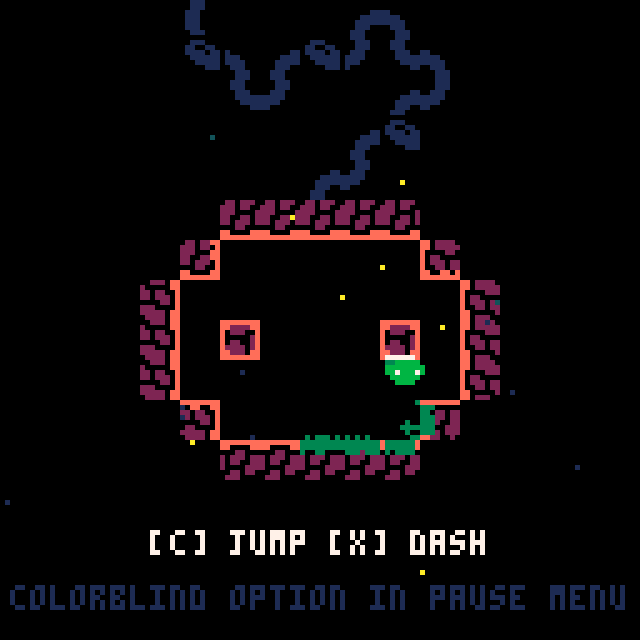
Start by moving with the arrow keys and touching the nearby floor and walls. The green moss left behind is your first navigation tool. It records where you have been, makes explored routes easy to recognize, and highlights surfaces that still need attention. You do not need to cover every pixel before moving on, but a mostly bare corner is often a useful clue.
Press C to jump. The early rooms are deliberately simple and teach the height and shape of the jump without a text tutorial. Look at where the level places safe ground, then experiment with short and full jumps. Falling is part of learning the route, not a reason to restart the entire game.
Press X to dash. A dash is not only a speed boost; it is the move that opens longer gaps and more unusual angles. Hold an arrow direction as you press X to control where the dash carries you. When a distant platform looks slightly beyond a normal jump, try combining the jump and dash rather than searching immediately for another entrance.
As the map opens, collect the visible leaves or room-completion markers and keep an eye on the mini-map. These markers help you understand which rooms have been explored cleanly. If you arrive at what looks like a dead end, check the room shape, touch suspicious surfaces, and remember the location. Moss Moss expects you to revisit old spaces after your movement knowledge improves.
Do not rush to a walkthrough the first time a route looks impossible. The world is small enough that moving to another room usually teaches the missing idea. Some routes only open up after you take the crown and gain its double jump, so note the spot and come back later rather than forcing it on your first pass.
![Moss Moss gameplay: the green explorer walks right across a cavern floor, leaving a bright moss trail behind it, with the on-screen hint [C] JUMP [X] DASH.](/images/guides/moss-moss/02-moss-trail.png)
Move with intention
Moss Moss Movement Systems Explained
Jump: C provides the basic vertical movement used throughout the game. Watch the character rather than the destination during your first attempts so you can learn the arc. Once the timing feels familiar, shift your attention toward the next landing point.
Dash: X creates a fast burst of movement. Direction matters. A horizontal dash clears distance, while a carefully aimed diagonal route can reach a higher ledge or clear a wider gap. Avoid wasting the dash at the start of a jump when normal momentum can carry you most of the way.
Double jump: the crown unlocks a second jump in the air. Treat this as a new movement tier rather than a small upgrade: several spirits and leaves sit behind ledges that are only reachable after you take the crown.
Room geometry: when a jump or dash repeatedly falls short, change the approach rather than repeating the same input. Look for a higher starting ledge, a shorter route to the same platform, or a room you have not opened yet.
The most reliable sequence is to use the cheapest action first. Walk when walking is enough, jump before spending a dash, and save the double jump for a gap that a single jump cannot clear. This keeps movement predictable and makes difficult rooms easier to repeat.
Exact totals and spoiler map
Moss Moss Map, 32 Leaves, and 15 Spirits
There are 32 leaves and 15 spirits in Moss Moss 1.4. Spirits are the small white collectibles that players also call rabbits, bunnies, or slugcats. The leaf counter is on screen; the spirit count is not, so track it yourself.
The map is an 8×4 grid of 32 screens. A run starts on screen 4-3. Any% finishes on 4-1, while a Fully Mossed run continues to the secret exit at the top of 5-1.
The crown is a milestone, not the true completion ending: it unlocks a double jump. A Fully Mossed run requires all 15 spirits, the secret exit, and the spirit elevator, so a crown-only finish leaves the final trigger unresolved.
For a spoiler-light search, use the in-game mini-map as a question list. A missing connection suggests that two areas may meet. Look for walls beside empty pockets, decorative-looking platforms, dead ends with unused space, and room shapes that do not align cleanly. Spread moss across those surfaces before deciding they are solid.
If you want the complete answer, open the full map page below and compare one region at a time. Checking the entire image after every room is slower and removes more discovery than using it only when a counter stops moving.
Stuck at 99%
Missing Your Last Leaf or Spirit
If the leaf counter is short: leaves follow a 32-step path and the HUD shows your total. Revisit rooms where you collected one leaf but the layout has room for another. Check above doorways, under structural-looking platforms, and along the edges of vertical shafts.
If you are missing a spirit: the HUD does not show how many spirits remain, so a missing spirit is easy to overlook. Count your pickups manually. The last spirit is reached after the crown: use the new double jump and head left from the crown area.
If both counts look complete but nothing happens: you are probably missing the ending trigger, not a collectible. With all 32 leaves and 15 spirits, go to the secret exit at the top of 5-1 and ride the spirit elevator.
Players on version 1.4 reported that a missing spirit was hard to notice; the author adjusted the HUD hints after that feedback. If your build behaves differently, check the version shown on the game page before assuming the route is wrong.
Spirit locations
How to Find All 15 Bunnies (Spirits)
Players searching for "all bunnies" mean the 15 spirits — the small white collectibles also called rabbits or slugcats. There is no in-game list of which ones you already have, and the HUD does not show how many remain, so the reliable method is to keep your own count and revisit rooms where you saw one but did not pick it up.
Work through the map one region at a time. Spirits sit in elevated alcoves, behind fake walls, and at the end of optional platforming branches. If a room has a ledge that looks too high, note it and come back after the crown; the double jump is what makes several of them reachable.
The last spirit is the one most players miss. After taking the crown, head left from the crown area with the double jump. If you have all 15 and the ending still does not trigger, the missing step is the secret exit at the top of 5-1, not another collectible.
Post-crown route
What Happens After the Crown
Picking up the crown grants a double jump. This is the point where previously unreachable ledges and rooms open up, so do not stop at the crown or assume the game is over.
From the crown, head left with the double jump to collect the last spirit. Then return to the map and use the double jump to reach any remaining leaves or secrets you skipped earlier.
With all 15 spirits collected, go to the secret exit at the top of 5-1 and take the spirit elevator. That triggers the Fully Mossed ending.
If you are following a speedrun video, note that Any% finishes at 4-1 and does not collect the spirits. A Fully Mossed route is a different route, so do not copy an Any% shortcut into a completion run without checking what it skips.
Completion route
Moss Moss 100% Completion Checklist
Use this checklist after a blind run. It does not reveal a room-by-room route, but it gives you a reliable way to diagnose what remains while keeping your progress between visits.
Saved on this device
0 of 8 completion checks
Older walkthroughs may describe slightly different timing or route behavior because the game received several updates. When a video technique does not reproduce reliably, check its publication date and prefer the current movement behavior over forcing an old shortcut.
Challenge a friend
Share Your Moss Moss Run
Finish a run, enter the time shown by the game, and send a challenge link. The link carries your category and time so a friend lands on the exact score to beat.
Use the format shown by the game, for example 12:34.56.
Faster, cleaner routes
Advanced Tips and Speedrun Notes
Speed comes from route planning more than frantic input. Enter each room already knowing the next exit, use a jump before spending the dash, and line up the next landing before you commit. A fast route minimizes corrections after landing.
Learn rooms in isolation before combining them into a run. Practice the hardest transition until it succeeds several times in a row, then connect it to the room before and after it. This produces more consistent improvement than restarting from the beginning after every missed dash.
Any% and full-completion runs reward different decisions. Any% prioritizes the shortest valid route to an ending. A fully mossed route must balance travel time with leaves, optional collectibles, and the final trigger. Do not copy an Any% shortcut into a completion route without checking what it skips.
Shortcuts can change between game versions. Moss Moss 1.4 (cart #17) rolled back one landing fix because it removed a speedrun strategy, so older videos may not reproduce exactly. Treat version-specific tricks as experiments rather than required techniques. The stable skills are accurate directional dashes, map awareness, and intentional room order.
Fix common problems
Moss Moss Troubleshooting
The arrow keys, C, or X do not work
Click once inside the game canvas to give it keyboard focus. Then test the controls again. Browser navigation or another page element may capture keys until the canvas is focused.
The game is cropped or too small
Use the Fullscreen button below the canvas. Press Escape to return to the page. If fullscreen opens incorrectly, leave fullscreen, reload the game, and try again after the title screen appears.
The game appears frozen
Use Reload below the game. This starts a new session, so only reload when the current run cannot continue. Closing background tabs can also help on devices with limited memory.
Can I continue a run later?
Moss Moss does not currently provide a normal save-and-resume flow. Plan to finish a run in one session, and avoid refreshing the page while progress is active.
Does mobile work?
HTML5 support allows the game to load on many mobile browsers, but performance and controls vary. A desktop keyboard offers the most predictable experience.
Why you can trust the page
How This Moss Moss Guide Is Maintained
Collectible totals and route details on this page were checked against Moss Moss 1.4 (cart #17, updated July 6, 2026), the author's Lexaloffle thread, and the current Fully Mossed speedrun notes. The game uses 32 leaves and 15 spirits. Older comments sometimes say 16 because the HUD does not show how many spirits remain.
Browser behavior, loading instructions, and page controls are reviewed when the site changes. Route advice is written to stay useful across small timing differences: read the mini-map, preserve movement options, and investigate unexplored geometry before assuming a room is finished.
If a game update changes a route or this checklist misses a useful completion signal, send the page URL and correction details to hello@mossmoss.net. Substantive corrections are reflected in the updated date above.
Keep exploring
Moss Moss Resources and Next Steps
After finishing a blind run, you can compare your route with the game's wider completion and speedrun community. Use current-version resources when possible, and expect full maps or complete walkthrough videos to reveal every hidden room.
Frequently asked questions
What are the Moss Moss controls?+
Use the arrow keys to move, C to jump, and X to dash.
Why is the game not responding to my keys?+
Click inside the game canvas first, then try the arrow keys, C, and X again.
Can I save a Moss Moss run?+
The game currently works best as a one-session experience and does not offer a normal save-and-resume flow.
How many leaves and spirits are in Moss Moss?+
A full run collects 32 leaves and 15 spirits. The leaf counter is shown on screen, but the HUD does not show how many spirits remain, so track those manually.
Where are all the bunnies in Moss Moss?+
There are 15 bunnies, also called spirits, rabbits, or slugcats. The HUD does not show how many remain, so keep your own count. The last one is reached by heading left from the crown area with the double jump.
Is the crown the true ending?+
No. The crown grants a double jump, but it is not the final completion state. Collect all 15 spirits, then use the secret exit at the top of 5-1 and the spirit elevator to trigger the Fully Mossed ending.